GestLaunch + Widget2.0.1
Publisher Description
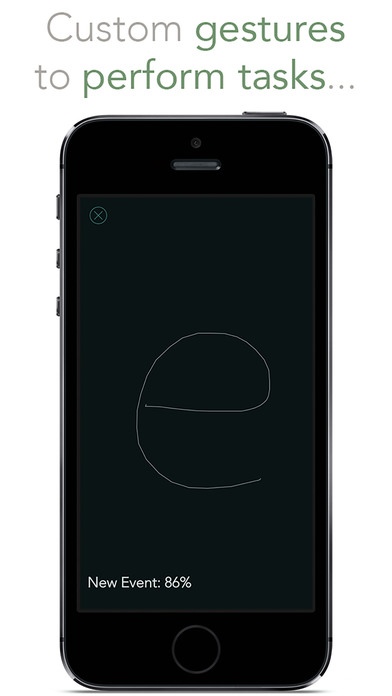
GestLaunch lets you quickly perform many complex tasks just by drawing on your screen!
You only need to associate a gesture to an action. When you'll launch the app, a recognition view will appear, and by drawing letters, numbers, words, shapes,... you'll be redirected to a task.
Through the NC Widget it's also possible to quickly enable/disable cellular data, add a reminder, translate the text you copied, share the images on your clipboard and much more!
The main supported actions are:
Launch an App
Call (FaceTime/FaceTime Audio/Phone)
Control Cellular-Data/WiFi/Hotspot/Location
Define Clipboard Text (Dictionary)
Google Maps Place from Clipboard
Google Maps Directions from Clipboard
Instagram Camera
Mail
Mail To
Maps Place from Clipboard
Maps Directions from Clipboard
Message
Message To
New Event
New Event (Fantastical)
New Reminder
New Reminder (Fantastical)
New Tweet
New Tweet (Tweetbot)
New Tweet from Clipboard
New Tweet from Clioboard (Tweetbot)
Open Website
Search Clipboard Text on Google
Search Clipboard Text on IMDb
Share Last Image
Share Clipboard Images
Speak Clipboard Text
Translate Clipboard Text
WhatsApp Message from Clipboard
WolframAlpha Query from Clipboard
N.B. It's also possible to manually add custom URLs.
PRO version advantages:
Widget
Unlimited number of gestures
Demo Video: http://youtu.be/z3Enrs8p8d4
For any question, suggestion, new feature request or bug report follow on twitter massimopiazza_ or write a mail at massimopiazza97@gmail.com
Requires iOS 7.0 or later. Compatible with iPhone, iPad, and iPod touch.
About GestLaunch + Widget
The company that develops GestLaunch + Widget is Massimo Piazza. The latest version released by its developer is 2.0.1.
To install GestLaunch + Widget on your iOS device, just click the green Continue To App button above to start the installation process. The app is listed on our website since 2014-07-28 and was downloaded 8 times. We have already checked if the download link is safe, however for your own protection we recommend that you scan the downloaded app with your antivirus. Your antivirus may detect the GestLaunch + Widget as malware if the download link is broken.
How to install GestLaunch + Widget on your iOS device:
- Click on the Continue To App button on our website. This will redirect you to the App Store.
- Once the GestLaunch + Widget is shown in the iTunes listing of your iOS device, you can start its download and installation. Tap on the GET button to the right of the app to start downloading it.
- If you are not logged-in the iOS appstore app, you'll be prompted for your your Apple ID and/or password.
- After GestLaunch + Widget is downloaded, you'll see an INSTALL button to the right. Tap on it to start the actual installation of the iOS app.
- Once installation is finished you can tap on the OPEN button to start it. Its icon will also be added to your device home screen.
